0 ratings





Item #:
221051385
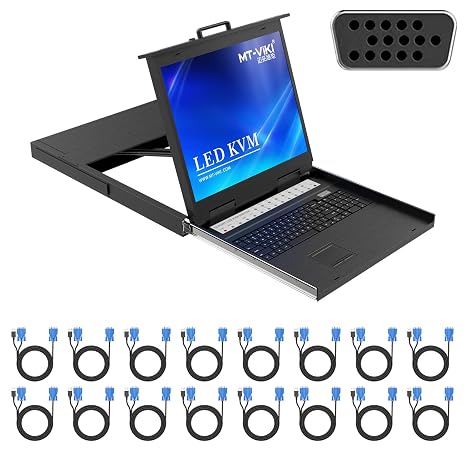
MT-VIKI 19'' LCD KVM Console, 16 Port VGA KVM Switch w/Keyboard+Monitor+Mouse+Drawer+Touchpad, Support OSD/Hotkey/Panel Button Switching (Included 16
89% of respondents would recommend this to a friend
 3 Sustainability Highlights
Item #:
221051385
BSD 1078
Price Details
Excluding Shipping & Custom charges ( Shipping and custom charges will be calculated on checkout )
*All items will import from US
In stock
 Imported from USA store
QTY:
Only 10 items left in stock.
Order now and get it around Thursday, October 08
Secured transaction
Ubuy works hard to protect your security and privacy. Our advanced payment security system ensures confidentiality by encrypting your information during transmission using AES (Advanced Encryption Standards) and SSL (Secure Socket Layer) protocols. Your payment details are 100% secure as we do not share your payment details with third party sellers.
Our Top Logistics Partners


Manage up to 16 computers with ease using the MT-VIKI Rack KVM Switch featuring a 17'' LCD monitor.

Fast
Shipping

Free
Return*

Secure Packaging

100% Original Products

PCI DSS Compliance

ISO 27001 Certified



What Stands Out
Integrated Design
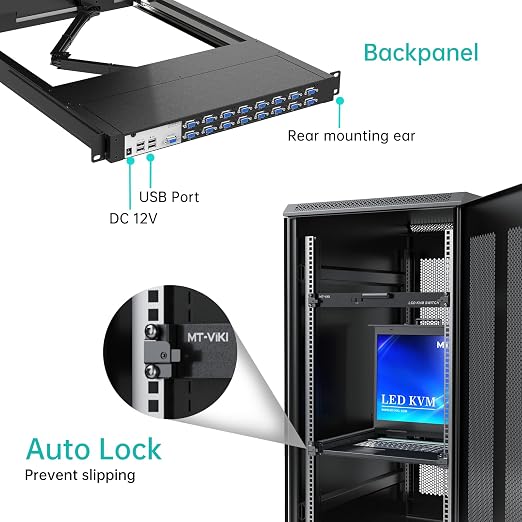
Combines a 19-inch LCD monitor, keyboard, and touchpad into a compact 1U rack format, saving space while enhancing accessibility and efficiency for server room operations.
Versatile Connectivity
Supports 8 port VGA connections, allowing seamless switching between multiple servers, catering to IT professionals needing expanded operational capabilities without extra hardware.
User-Friendly Controls
Equipped with OSD, hotkey, and button options for easy navigation, ensuring streamlined control and management of connected devices, perfect for busy server administrators.
Product Details
| Operation Mode | ON-OFF-ON |
| Current Rating | 3 A |
| Operating Voltage | 12 volts_of_direct_current |
| Contact Type | Normally Closed |
| Connector Type | Plug In |
| Switch Type | Rack Mount |
| Terminal | Plug in |
| Circuit Type | 16-way |
| Mounting Type | Rack Mount |
| Number of Positions | 16 |
| Control Method | Touch |
| Control Type | touch |
| Compatible Devices | Computers running Dos/Windows, Linux, Unix, Mac OS8.6/9/10 with standard VGA ports or USB ports for mouse |
| Color | 16 Port |
| Item Dimensions | 18.9 x 23.6 x 1.7 inches (48 x 59.9 x 4.3 cm) |
| Unit Count | 1 Count |
| Number of Items | 1 |
| Material Type | Metal |
| Contact Material | Copper, Brass |
| Brand Name | MT-VIKI |
| Manufacturer | MT-VIKI |
| Part Number | 1916UL |
| Brand | MT-VIKI |
| Material | Metal |
| Item dimensions L x W x H | 18.9 x 23.6 x 1.7 inches (48 x 59.9 x 4.3 cm) |
Who Should Buy?

-
Data Centers
Ideal for managing multiple servers in a compact data center setup with efficient operations and monitoring.
-
IT Administrators
Perfect for IT staff who require streamlined access and control over multiple computers and servers simultaneously.
-
Space-Constrained Environments
Designed for rack-mounted setups, minimizing space usage while providing essential functionality and monitoring capabilities.

-
Home Users
Not suitable for casual home users needing basic functionality without complex KVM switching for multiple devices.
Product Description
Sustainability Highlights
This product has sustainability features recognized by trusted certifications.
Recycled materials
Contains at least 50% recycled material. As certified by
Global Recycled Standard (GRS) certified products contain recycled content (>50%) that has been independently verified at each stage of the supply chain, from the source to the final product and meet social, environmental, and chemical requirements. The purchase of Global Recycled Standard (GRS) certified products supports the use of recycled content in the supply chain. Learn more about this certification
- Certification Body
- USB Certification
- Certification Number
- TE-00345189
Safer chemicals
Made with chemicals safer for human health and the environment. As certified by
Global Recycled Standard (GRS) certified products contain recycled content (>50%) that has been independently verified at each stage of the supply chain, from the source to the final product and meet social, environmental, and chemical requirements. The purchase of Global Recycled Standard (GRS) certified products supports the use of recycled content in the supply chain. Learn more about this certification
- Certification Body
- USB Certification
- Certification Number
- TE-00345189
Worker well-being
Manufactured on farms or in facilities that protect the rights and/or health of workers. As certified by
Global Recycled Standard (GRS) certified products contain recycled content (>50%) that has been independently verified at each stage of the supply chain, from the source to the final product and meet social, environmental, and chemical requirements. The purchase of Global Recycled Standard (GRS) certified products supports the use of recycled content in the supply chain. Learn more about this certification
- Certification Body
- USB Certification
- Certification Number
- TE-00345189
Have any Query? Chat with us
Customer Questions & Answers
-
Question:
What is an LCD KVM Console and how does it function?
Answer: An LCD KVM Console is a device that allows users to manage multiple computers or servers from a single interface. It integrates a monitor, keyboard, and mouse into a single unit, making it convenient for IT professionals to control various systems. Typically, it connects through a KVM switch, which enables seamless switching between connected devices with features like OSD, hotkey access, and panel buttons for easy navigation. This setup is particularly useful in data centers where space is limited but control over multiple systems is necessary. -
Question:
What are the main features of the MT-VIKI 19' KVM Console?
Answer: The MT-VIKI 19' LCD KVM Console features a 16-port VGA KVM switch that supports multiple computers. It includes built-in keyboard, monitor, mouse, and touchpad, all neatly integrated in a drawer for efficient use of space. The device supports OSD functionality for quick setup and switching, hotkey controls for fast access to different computers, and a panel button for the best user experience. This combination of features makes it ideal for IT professionals managing various systems in one location. -
Question:
How does the touchpad functionality enhance usability?
Answer: The touchpad functionality on the MT-VIKI KVM Console adds an extra layer of convenience for users. It allows for swift and precise navigation without needing an external mouse, which is especially beneficial in tight workstation environments. The touchpad is intuitive and responds well, making it simple for users to access applications or settings across different systems seamlessly. Whether you are troubleshooting, configuring systems, or performing updates, having a built-in touchpad enhances overall efficiency. -
Question:
Can the MT-VIKI KVM Console support remote access?
Answer: While the MT-VIKI 19' LCD KVM Console itself does not offer remote access capabilities directly, it can be integrated with other remote management tools or systems that allow for remote control of connected devices. This can be particularly useful for IT administrators who need to manage servers from different locations without physically being present. Combining the KVM Console with remote access software creates a comprehensive solution for remote server management. -
Question:
What types of devices can be connected to this KVM Console?
Answer: The MT-VIKI KVM Console is designed to connect with devices that have VGA output, such as PCs, servers, and certain workstations. Its versatility allows for connections to a wide range of systems in various environments, from data centers to home offices. Each connected device can be easily accessed through the console, making it a valuable tool for managing multiple machines effectively. -
Question:
What benefits does a KVM switch provide?
Answer: A KVM switch like the one integrated into the MT-VIKI KVM Console streamlines the management of multiple systems by allowing users to control several devices from one keyboard, monitor, and mouse setup. This reduces clutter, saves space, and enhances efficiency since users don't need to switch between multiple setups. The ability to switch devices with hotkeys or OSD further adds to the user experience, making it ideal for busy professionals and technical support teams. -
Question:
How do I set up my MT-VIKI KVM Console?
Answer: Setting up your MT-VIKI KVM Console involves connecting the console to the VGA ports of your computers using the provided cables. Once connected, power on the console and each of the connected devices. You can then use the OSD menu or hotkeys to switch between the connected systems, simplifying the process of managing multiple machines. The setup is straightforward, allowing users to quickly access and control all connected systems from one point. -
Question:
What makes the panel buttons important in operation?
Answer: The panel buttons on the MT-VIKI KVM Console are crucial for quick and effortless system navigation. These buttons enable users to switch between connected systems instantly without relying on keyboard shortcuts, providing an alternative method for those who prefer physical controls. This feature is particularly useful in fast-paced environments where immediate access to different machines is required, enhancing productivity and user convenience. -
Question:
Does the KVM Console require any special software to operate?
Answer: The MT-VIKI KVM Console operates independently without requiring additional software for basic functionality. Users can switch between connected devices using built-in features like OSD and hotkeys. However, if users wish to combine the console with remote management solutions, specific software might be needed depending on the remote access tool chosen. This ensures flexibility, allowing users to customize their setup as needed. -
Question:
Where can I buy the MT-VIKI 19' LCD KVM Console?
Answer: You can purchase the MT-VIKI 19' LCD KVM Console from Ubuy in The Bahamas. Ubuy offers a great selection of electronic devices, ensuring hassle-free shopping with a reliable platform. By choosing Ubuy, you'll enjoy competitive offerings and a straightforward purchasing experience tailored to your needs.
MT-VIKI KVM Switches Editorial Review
MT-VIKI KVM Rack console w/19'' LCD Monitor, 8 Port VGA KVM Switch with Keyboard Touchpad Monitor, Fit for 1U 19'' Rack, OSD/Hotkey/Button with 8 KVM Cable offers a reliable solution for managing multiple computers from a single console. This KVM switch features an 8-way circuit type and supports various operating systems including Windows, Linux, Unix, and Mac OS, making it versatile for different setups. Users appreciate the touch control feature and the robust aluminum construction that enhances durability. The compact design of 18.9 x 23.6 x 1.7 inches ensures it fits seamlessly into a standard 1U rack, saving valuable space. Additionally, the push-button control allows for easy operation, meeting various needs for IT management.
Customer Reviews & Ratings
2 customers ratings
-
5 Star
50%
-
4 Star
0%
-
3 Star
50%
-
2 Star
0%
-
1 Star
0%
Review this product
Share your thoughts with other customers
Pros
- Compact design fits standard 1U racks
- Durable aluminum material ensures longevity
- Supports multiple operating systems effectively
- User-friendly push-button control feature
- Versatile 8-way circuit for comprehensive management
Cons
- Might require additional setup time for configuration
Platform Trust & Buyer Confidence

JK
Jasmin
Verified buyer
“Great products and very good service: very easy and very fast international delivery.”
9 September 2026 · via Trustpilot
AG
Anke
Verified buyer
“Wonderful online shopping experience, smooth transaction from the start. Payment method works conveniently and delivery is unexpectedly fast and reliable. You go the extra mile for service. What makes this even more amazing, you deliver to Namibia. I will remain a happy Ubuy customer and will increase my purchases for sure! Thank you!”
10 September 2026 · via Trustpilot
H
Hazel
Verified buyer
“Very easy to find the products what you need, and so fast delivery, that’s why I highly recommended to others costumers to used ubuy.”
10 September 2026 · via Trustpilot
O
Opaleye
Verified buyer
“I received exactly what I ordered I was skeptical about your site because that was my first time to order. But the order came timely and neatly packaged. I was not disappointed. Thank you.”
11 September 2026 · via Trustpilot
AC
Adele
Verified buyer
“Easy to find and order what you want on the website. Delivery is quick to the UK”
8 September 2026 · via Trustpilot
Secure Checkout
Global Delivery
Easy Returns
Genuine Products
Product Price History
Important information
- Limitations : For products shipped internationally, please note that any manufacturer warranty may not be valid; manufacturer service options may not be available; product manuals, instructions, and safety warnings may not be in destination country languages; the products (and accompanying materials) may not be designed in accordance with destination country standards, specifications, and labeling requirements; and the products may not conform to destination country voltage and other electrical standards (requiring use of an adapter or converter if appropriate). The recipient is responsible for assuring that the product can be lawfully imported to the destination country. When ordering from Ubuy or its affiliates, the recipient is the importer of record and must comply with all laws and regulations of the destination country.
- Not all the products listed on Ubuy are for sale, as Ubuy is a global search engine. Products are subject to export/trade regulations.
BSD 1078
Order now and get it around Thursday, October 08
This item is not restrict in my country.(Please click on above link if this item is not restrict in your country, So our team will review and allow.)
QTY:
Only 10 items left in stock.
Secured transaction
PCI DSS compliant and ISO 27001:2022 certified, with encrypted payments and full buyer protection on every order.
Our Top Logistics Partners
Fastest cross-border delivery
Features & Benefits
- Supports control of 16 computers from a single user.
- Includes a 17'' LCD monitor for clear display.
- Compatible with various operating systems including Windows, Linux, and Mac.
- Mountable in a 19'' rack, designed for 1U installation.
- Equipped with advanced security features including 2-level password protection.
- Comes with 8 KVM cables for immediate setup.
Ubuy Assurance
Experience worry-free shopping with 100% original products, PCI DSS-compliant payment security, ISO 27001-certified data protection, the fastest cross-border delivery, free returns *, and secure packaging on every order.