- Home Page /
- Office Products /
- Office Electronics /
- Electronic Dictionaries, Thesauri & Translators /
- Foreign Language Translators /
- AI VoiceWriter Smart Dictation & AI Writing A...
0 ratings




Item #:
100904536
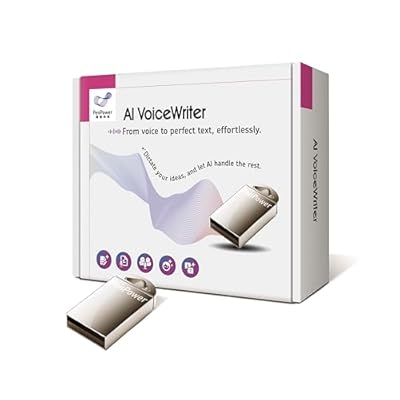
AI VoiceWriter Smart Dictation & AI Writing Assistant for Windows & Mac | USB Dongle & Mobile App for Voice Input, Proofreading, Rewriting &
Item #:
100904536
BSD 100
Price Details
Excluding Shipping & Custom charges ( Shipping and custom charges will be calculated on checkout )
*All items will import from US
0 ratings
Write a review
In stock
 Imported from USA store
QTY:
Order now and get it around Wednesday, June 24
Secured transaction
Ubuy works hard to protect your security and privacy. Our advanced payment security system ensures confidentiality by encrypting your information during transmission using AES (Advanced Encryption Standards) and SSL (Secure Socket Layer) protocols. Your payment details are 100% secure as we do not share your payment details with third party sellers.
Our Top Logistics Partners


Enhance your efficiency in surprising ways for content creation and refinement!

Fast
Shipping

Free
Return*

Secure Packaging

100% Original Products

PCI DSS Compliance

ISO 27001 Certified


What Stands Out
Cross-Platform Compatibility
AI VoiceWriter seamlessly operates on both Windows and Mac platforms, allowing users to transcribe and edit speech effortlessly across devices.
AI-Powered Proofreading
Utilizing advanced AI, this solution not only transcribes but also offers proofreading and rewriting assistance, ensuring top-notch accuracy and clarity in your documents.
Versatile Voice Typing
With its mobile app and USB dongle, users can easily integrate voice typing into various applications, enhancing productivity and workflow efficiency on-the-go.
Product Details
- 🎙️ Hands-Free Voice Typing for Windows & Mac – Powered by iOS & Android dictation technology, AI VoiceWriter allows fast, accurate speech-to-text directly on your desktop. Simply speak, and your words appear in real time. Compatible with Windows 10 & above, macOS 13 & above.
- ✍️ AI Writing Assistant for Effortless Editing – Boost productivity with AI proofreading, rephrasing, and formatting. Perfect for emails, reports, creative writing, and professional content.
- 💻 Works Seamlessly in Any Desktop App – Type with your voice in Microsoft Word, Google Docs, PowerPoint, Teams, emails, and more. Just place your cursor in any text field and start speaking!
- 📱 Mobile App for Enhanced Voice Input – The AI VoiceWriter mobile app enhances voice recognition by using your phone’s microphone as an input device for clearer, more accurate dictation—while typing on your desktop. Supports iOS 15 & above, Android 9.0 & above.
- 🌎 Multilingual Voice Typing & AI Assistance – Supports 33 languages for dictation, plus AI-powered features in Chinese, English, Japanese, Korean, French, German, Spanish, Italian and, Swedish.
- 💡 One-Time Purchase – No Subscriptions – Get lifetime software updates and the latest enhancements without extra fees.
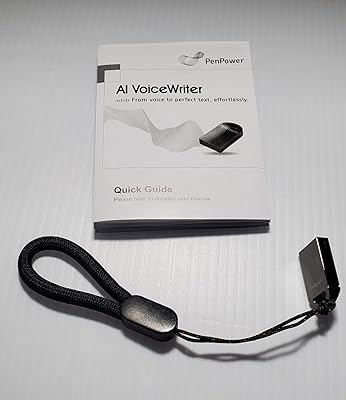
- [How To Use] - 1. Plug the USB dongle to your laptop or desktop 2. Download the AI VoiceWriter mobile app on your mobile phone 3. Turn on one of the text processing software you’d like to input 4. Start speaking out your ideas and inspiration. 5. Supported OS: Android 9.0 or above, iOS 15 or above, Windows 10 or above, Mac OS 13 or above.
| Compatible Devices | Laptop, desktop |
| Hardware Interface | USB |
| Microphone Form Factor | Lavalier |
| Format | Multiple Formats |
| Headphones Jack | No headphones jack |
| Memory Storage Capacity | 4 GB |
| Digital Recording Time | Less than 1 hour |
| Microphone Operation Mode | speech recognition |
| Item Weight | 75 Grams |
| Brand | PenPower |
| Model Number | 4710837754330 |
| Manufacturer | PenPower |
| Mfr Part Number | SVTAIS01EN |
Who Should Buy?

-
Authors and Writers
Ideal for authors who need quick transcription of their thoughts into written content using voice commands.
-
Students and Researchers
Beneficial for students needing to transcribe lecture notes or research interviews effectively without typing.
-
Professionals in Meetings
Great for professionals who want to transcribe meetings or discussions on the fly for improved documentation.

-
Casual Users
Not suitable for casual users who infrequently require speech-to-text conversion or have limited technical skills.
-
Non-English Speakers
May not perform well for users who communicate primarily in languages other than English due to limited language support.
-
Heavy Editing Needs
Not ideal for professionals requiring extensive manual editing, as AI proofreading may not fully meet detailed quality requirements.
Product Description
Have any Query? Chat with us
Customer Questions & Answers
-
Question:
What is AI VoiceWriter and how does it work?
Answer: AI VoiceWriter is a smart dictation and AI writing assistant designed for both Windows and Mac systems. It works by utilizing advanced speech recognition technology to convert spoken words into written text. The device includes a USB dongle for connecting to computers and a mobile app for voice input, making it versatile and accessible. Users can dictate documents, emails, or notes, and the AI assists with proofreading, ensuring that your writing is clear and error-free. Whether you're a student needing to write essays or a professional drafting reports, AI VoiceWriter enhances productivity. -
Question:
Can I use AI VoiceWriter on multiple devices?
Answer: Yes, AI VoiceWriter is compatible with both Windows and Mac platforms, making it very versatile. You can use the USB dongle with a computer and download the mobile app on your smartphone, allowing seamless transitions between devices. This adaptability is perfect for users who work in different environments, such as switching from a desktop at the office to a laptop while traveling. The integration across devices enhances workflow efficiency and ensures that you can capture your ideas whenever inspiration strikes. -
Question:
What features does AI VoiceWriter offer?
Answer: AI VoiceWriter offers a range of features including advanced speech recognition, real-time proofreading, and voice input capabilities. Users can dictate text and hear corrections instantly, which helps in refining writing on-the-go. The mobile app extends functionality, allowing for voice recording from anywhere, while the USB dongle ensures reliable performance when connected to a computer. These features cater to diverse needs, from content creation and transcription to note-taking and brainstorming, making it an ideal tool for writers, students, and professionals alike. -
Question:
Is AI VoiceWriter suitable for non-English languages?
Answer: AI VoiceWriter primarily focuses on English language dictation and writing assistance. However, the product may include support for basic functionalities in other languages, but this may vary based on updates and app capabilities. For users looking to work in multiple languages, it’s advisable to check the latest software updates and language packs that could enhance multi-language support. This makes it a versatile tool for bilingual users who are comfortable switching between languages during their writing tasks. -
Question:
How does AI VoiceWriter handle punctuation and formatting?
Answer: AI VoiceWriter effectively recognizes natural speech patterns, which allows it to understand when to insert punctuation marks like commas and periods based on your pauses and speech tone. Additionally, it can handle basic formatting commands, allowing users to dictate text styles (such as bold or italics). This capability is particularly beneficial for content creators who need to maintain the flow of their thoughts while dictating. It streamlines the writing process, making it simple to create well-structured documents without constantly stopping to adjust formatting manually. -
Question:
Can I edit text after using AI VoiceWriter?
Answer: Absolutely! After dictating through AI VoiceWriter, users can easily edit the generated text using standard editing tools on their devices. Whether you're correcting errors or tweaking the content, the AI's proofreading feature provides suggestions to enhance clarity and grammar. This interactive experience allows you to refine your work further, ensuring that your final output meets your expectations, whether it’s for professional reports or personal notes. -
Question:
What are the system requirements for AI VoiceWriter?
Answer: AI VoiceWriter requires a computer running on Windows or macOS, depending on the version being used. Ensure that your device has a USB port available for the dongle and an active internet connection to facilitate updates and access app features. These system requirements enable smooth operation and optimal performance, maximizing the benefits of voice recognition technology for efficient writing assistance. -
Question:
How do I install the AI VoiceWriter software?
Answer: To install the AI VoiceWriter software, first connect the USB dongle to your computer. Then, visit the official website or the app store on your device to download the software or mobile app. Follow the on-screen prompts for installation instructions. The setup process is user-friendly and typically takes just a few minutes. Once installed, you can start using AI VoiceWriter for all your dictation and writing needs, ensuring that you’re ready to boost your productivity right away. -
Question:
Where can I buy AI VoiceWriter in The Bahamas?
Answer: You can conveniently purchase AI VoiceWriter from Ubuy, an online shopping platform that offers various products across different categories. Ubuy provides a user-friendly shopping experience with detailed product descriptions and reviews, allowing you to make informed decisions. With options tailored to users in The Bahamas, Ubuy ensures that you have access to the smart dictation and writing assistant that meets your needs. -
Question:
What can I do if AI VoiceWriter doesn't recognize my voice accurately?
Answer: If AI VoiceWriter does not accurately recognize your voice, it may help to adjust your speaking style or reduce background noise. Ensure that you are using a good-quality microphone and that you articulate your words clearly. Additionally, consider going through the voice training tutorials available within the app to improve recognition. Regular use will also enhance the AI's understanding of your speech patterns. These steps can significantly improve the tool's performance and user satisfaction.
PenPower Foreign Language Translators 4710837754330 Editorial Review




The AI VoiceWriter — a speech-to-text transcription tool — presents a mixed experience for users, with specific features standing out but also drawing criticism. Many users find the software's reliance on a smartphone as a necessary input device to be a significant drawback. For those skeptical about security, the requirement for the app to access more information on their phones raises alarms. Users would prefer a standalone solution that runs directly from their computers, feeling more secure. Initial navigation and setup appear to be cumbersome as well. Despite a provided manual, some users struggle with the installation process, highlighting it as slightly unintuitive. Once operational, users appreciate the voice-to-text capabilities but warn that clarity in dictation is crucial; the software works best if you are organized and articulate in your speech. The capability of transcribing in multiple languages, including live chat translation, is praised as an impressive feature. However, shortcomings emerge when users attempt to transcribe directly into conventional word processing software like Word. They express frustration with the small interface in the AI VoiceWriter, which hampers efficiency due to an inability to easily view previous sentences and apply AI proofreading features. While the tool offers advanced AI features and a chatroom for multilingual communication, many users believe that similar functionalities are readily available in free web-based AI services, which can undercut the perceived value of the VoiceWriter. Overall, while the AI VoiceWriter holds potential, it's clear that several enhancements are needed for a smoother user experience. **
Customer Reviews & Ratings
84 customers ratings
-
5 Star
44%
-
4 Star
14%
-
3 Star
12%
-
2 Star
5%
-
1 Star
25%
Review this product
Share your thoughts with other customers
Pros
- Capable of transcribing and translating multiple languages.
- Offers a unique chat feature for real-time language conversion.
- Provides advanced proofreading and rewriting tools.
Cons
- Requires a smartphone for basic functionality, raising security concerns.
Product Price History
Important information
- Limitations : For products shipped internationally, please note that any manufacturer warranty may not be valid; manufacturer service options may not be available; product manuals, instructions, and safety warnings may not be in destination country languages; the products (and accompanying materials) may not be designed in accordance with destination country standards, specifications, and labeling requirements; and the products may not conform to destination country voltage and other electrical standards (requiring use of an adapter or converter if appropriate). The recipient is responsible for assuring that the product can be lawfully imported to the destination country. When ordering from Ubuy or its affiliates, the recipient is the importer of record and must comply with all laws and regulations of the destination country.
- Not all the products listed on Ubuy are for sale, as Ubuy is a global search engine. Products are subject to export/trade regulations.
BSD 100
Order now and get it around Wednesday, June 24
This item is not restrict in my country.(Please click on above link if this item is not restrict in your country, So our team will review and allow.)
QTY:
Secured transaction
Ubuy works hard to protect your security and privacy. Our advanced payment security system ensures confidentiality by encrypting your information during transmission using AES (Advanced Encryption Standards) and SSL (Secure Socket Layer) protocols. Your payment details are 100% secure as we do not share your payment details with third party sellers.
Our Top Logistics Partners
Fastest cross-border delivery
Features & Benefits
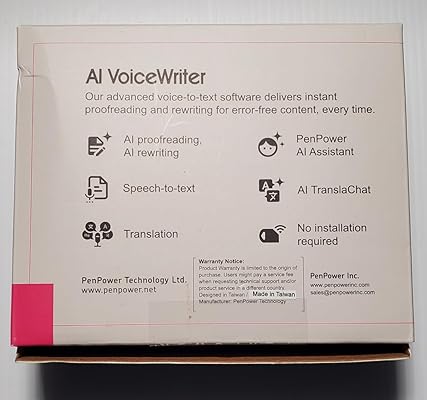
- AI-powered voice-to-text transcription for PCs.
- Compatible with popular software like MS Word and Google Docs.
- Instant proofreading and rewriting for error-free content.
- Mobile app and USB dongle for seamless operation.
- Real-time translation for up to three languages.
- Perfect for students, writers, and professionals alike.