0 ratings


Item #:
82717587
Minisopuru Upgrade DisplayLink Docking Station Triple Monitor with 140W Power Adapter,45W Charging,Docking Station for MacBook
Item #:
82717587
BSD 221
Price Details
Excluding Shipping & Custom charges ( Shipping and custom charges will be calculated on checkout )
*All items will import from US
15%
0 ratings
Write a review
In stock
 Imported from USA store
QTY:
Order now and get it around Wednesday, June 24
Secured transaction
Ubuy works hard to protect your security and privacy. Our advanced payment security system ensures confidentiality by encrypting your information during transmission using AES (Advanced Encryption Standards) and SSL (Secure Socket Layer) protocols. Your payment details are 100% secure as we do not share your payment details with third party sellers.
Our Top Logistics Partners


The upgraded Displaylink docking station 3 monitors with a 140W power adapter that charges for the laptop and dock.

Fast
Shipping

Free
Return*

Secure Packaging

100% Original Products

PCI DSS Compliance

ISO 27001 Certified


What Stands Out
Triple Monitor Support
Easily connect up to three monitors using HDMI and DisplayPort outputs, enhancing productivity for multitaskers and professionals requiring extensive screen real estate.
High Power Delivery
With a robust 140W power adapter and 45W charging capability, this docking station efficiently powers your devices while ensuring stable performance, ideal for demanding workflows.
Versatile Compatibility
Designed for both Mac and Windows systems, including Thunderbolt 4/5, the docking station offers universal connectivity options for various devices, enhancing flexibility for users.
Product Details
- 【Minisopuru Upgraded DisplayLink Docking Station】: The upgraded Displaylink docking station 3 monitors with a 140W power adapter that charges for the laptop and dock. The triple monitor docking station is equipped with 15 ports: 3*4K HDMI,2*4K DisplayPort,2*10Gbps+45W USB C ports,3* 5Gbps USB A ports, 1000Mbps Ethernet, audio, TF/SD. You just plug in a USB-C host cable to expand three different displays, connect various peripherals to quickly transfer data, and charge phones, and iPads simultaneously.
- 【Powerful 140W Power Adapter Included】:This triple display docking station comes with a 140W power adapter without an additional power adapter, directly provides up to 85W fast charging for your laptop, and simultaneously can use the USB-C port on the front of the display link docking stations to provide up to 45W charging for your phone and iPad. ★Note: When two USB-C Ports are charged, a single port can provide up to 22W power supply. Keep your devices charged all day and improve your office efficiency.
- 【Unlock 4K Triple/Dual Different Display】:The laptop docking station 3 monitors with 3x HDMI and 2x DisplayPort By installing the DisplayLink driver, your MacBook is not limited by the M1/M2/M3/M4 chip, easily enjoy various display combinations: 2x 4K DisplayPort(DisplayLink Driver), 2x 4K HDMI (DisplayLink Driver), 1x HDMI Alt Mode(Display3). ★Note: Must install the DisplayLink driver on your laptop to ensure proper all media display functionality.
- 【Widely Compatibility of Displaylink Dock】:The 3 hdmi docking station triple monitor is compatible with Thunderbolt 5/4/3, MacBook M1 M2 M3 and New MacbBok M4, Windows, Chrome OS, Ubuntu, etc full-featured USB-C laptops and Android.★Linux/Unix is not supported. The usb c docking station solves the limitations of USB A laptops by extending dual monitors with the USB A converter.★ Note: Due to the laptop's USB A port (up to 7.5W)limitation, the USB C host cannot charge the laptop, and the HDMI Alt mode (Display3) cannot work.
- 【Super-speed Data Transfer Experience】:The docking station 3 monitors feature 3x USB A 3.2Gen1 and 2x Type-C ports, supporting data transfer speeds up to 5 or 10Gbps that effortlessly transfer videos and other files within seconds. It can also charge your external devices at the same time. The 3 monitor docking station is also equipped with a TF/SD card slot is very suitable for editors and for use in travel, business trips, at home, meetings, etc.
| Hardware Interface | DisplayPort, Ethernet, HDMI, USB 3.1 Type B, USB 3.2 Gen 2 |
| Compatible Devices | MacBook M1, M2, M3, M4, Pro, Air, iMAC 24 inch, iMac Mac Mini 2018 Later, Laptops with Full-featured USB Type-C port (support Display, charging, and data transfer protocol), Compatible Windows, Chrome OS, Ubuntu, Android devices (excluding Linux/Unix) |
| Total Usb Ports | 6 |
| Number of Ports | 15 |
| Total Number of HDMI Ports | 3 |
| Wattage | 140.0 |
| Smart Home Compatibility | Not Smart Home Compatible |
| Item Dimensions L x W x H | 6.61"L x 3.38"W x 1.06"H (16.8 x 8.6 x 2.7 cm) |
| Item Weight | 1.59 Pounds (720 grams) |
| Color | Silver |
| Brand | minisopuru |
| Manufacturer | minisopuru |
| Model Number | MD6950D |
| Mfr Part Number | MD6950D |
| Unit Count | 1.0 Count |
| Compatible Devices | MacBook M1, M2, M3, M4, Pro, Air, iMAC 24 inch, iMac Mac Mini 2018 Later, Laptops with Full-featured USB Type-C port (support Display, charging, and data transfer protocol), Compatible Windows, Chrome OS, Ubuntu, Android devices (excluding Linux/Unix) See more |
| Total USB Ports | 6 |
| Product Dimensions (L x W x H) | 6.61"L x 3.38"W x 1.06"H (16.8 x 8.6 x 2.7 cm) |
| Total HDMI Ports | 3 |
Who Should Buy?

-
Content Creators
Ideal for designers and video editors needing multiple displays for efficient multitasking and workspace expansion.
-
Remote Workers
Perfect for professionals working from home who require extensive connectivity for various devices and peripherals.
-
Gamers
Supports multi-monitor setups to enhance the gaming experience with additional screens for immersive gameplay.

-
Basic Users
Casual computer users may not need extensive connectivity options and multitasking capabilities provided by this dock.
-
Traveling Professionals
Bulkiness and weight make it unsuitable for those who prioritize portability in their tech accessories.
-
Budget Shoppers
Those with limited budgets might find the pricing of this docking station not aligning with their financial constraints.
Product Description
Have any Query? Chat with us
Customer Questions & Answers
-
Question:
What devices are compatible with the Minisopuru Upgrade DisplayLink Docking Station?
Answer: The Minisopuru Upgrade DisplayLink Docking Station is designed to be compatible with all MacBook models that support USB-C connections. This includes MacBook Pro and MacBook Air, enabling users to expand their workstation with up to three external monitors. The docking station utilizes DisplayLink technology, allowing for high-resolution support and enhanced graphics. It's ideal for professionals needing a multi-monitor setup for tasks such as programming, graphic design, or productivity-heavy work, allowing a seamless workflow between devices. -
Question:
How do I set up the Minisopuru DisplayLink Docking Station?
Answer: Setting up your Minisopuru DisplayLink Docking Station is straightforward. Simply connect the dock to your MacBook using the provided USB-C cable, then attach your monitors through the HDMI or DisplayPort outputs. Install the necessary DisplayLink drivers from the official website to ensure optimal performance. This setup is particularly beneficial for users who often multitask on different applications, providing an expansive visual workspace that can boost efficiency and make navigating tasks smoother. -
Question:
How does the 140W power adapter benefit my MacBook?
Answer: The 140W power adapter that comes with the Minisopuru Docking Station effectively sustains your MacBook's power needs while using multiple monitors. This high wattage is particularly beneficial during intensive tasks like video editing or gaming, ensuring your laptop receives adequate power without draining its battery. Furthermore, this adapter supports fast charging for connected devices, such as smartphones or tablets, making it an excellent all-in-one solution for your charging needs during a busy workday or while presentations. -
Question:
Can I use the docking station with non-Mac devices?
Answer: Yes, the Minisopuru Upgrade DisplayLink Docking Station can also be used with non-Mac devices that support USB-C or DisplayLink technology. This includes many Windows laptops and some Android devices, making it a versatile accessory for various setups. Users can benefit from enhanced multitasking capabilities across platforms, whether for work presentations, gaming setups, or simple screen expansions. It's an excellent choice for families or teams with diverse device types needing consistent connectivity. -
Question:
What resolutions can I achieve with this docking station?
Answer: The Minisopuru Upgrade DisplayLink Docking Station supports resolutions up to 4K (3840 x 2160) at 60Hz, depending on the number of monitors connected. Using multiple monitors allows you to customize your workspace based on your tasks, whether it’s for graphic design, data analysis, or even casual browsing. Users can enjoy clearer visuals and more workspace, making it particularly advantageous for professionals who rely on high-definition graphics and video quality. -
Question:
Does it support audio output through the monitors?
Answer: Yes, the Minisopuru Upgrade DisplayLink Docking Station supports audio output through the HDMI ports connected to your monitors. This feature allows users to enjoy multimedia content without needing additional audio devices. You can seamlessly switch between video presentations, conference calls, or streaming, ensuring that audio and visuals are in sync. It’s especially useful for professionals who frequently engage in virtual meetings or content creators looking to enhance their workflow while producing videos. -
Question:
Is the docking station easy to carry for travel?
Answer: The Minisopuru Upgrade DisplayLink Docking Station is designed with portability in mind. Its compact size and lightweight build make it easy to slip into a laptop bag along with your MacBook. This feature is particularly valuable for professionals and students who need to set up in different locations, such as co-working spaces, cafes, or client sites. You can maintain a high-performance workstation on the go without compromising your productivity. -
Question:
What cables do I need to connect the docking station to my monitors?
Answer: To connect your monitors to the Minisopuru Upgrade DisplayLink Docking Station, you will need HDMI or DisplayPort cables, depending on the specific inputs of your monitors. Ensure that your monitor supports the required resolution and refresh rate for optimal performance. This flexibility allows users to customize their setups based on preferred technologies, facilitating better multitasking whether you're doing high-resolution photo editing or running software applications side by side. -
Question:
Where can I buy the Minisopuru Upgrade DisplayLink Docking Station in The Bahamas?
Answer: You can purchase the Minisopuru Upgrade DisplayLink Docking Station with 140W Power Adapter, 45W Charging via Ubuy in The Bahamas. Ubuy offers a straightforward online shopping experience, allowing you to browse through the product details, customer reviews, and other features easily. With Ubuy, you can ensure that you are making a well-informed decision while also enjoying reliable service and support for your purchase.
minisopuru Docking Stations MD6950D Editorial Review


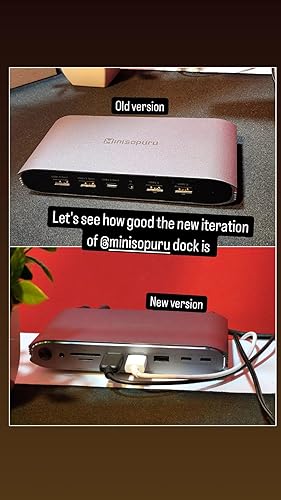
**** The Minisopuru Upgrade DisplayLink Docking Station has garnered a strong reception among users looking for reliable solutions to expand connectivity, especially for Apple devices like the MacBook Air and MacBook Pro. Customers have highlighted the docking station's ability to support multiple external monitors seamlessly, with up to three screens functioning simultaneously—an attractive feature for those needing enhanced workspace capabilities. Users have particularly appreciated the device's versatile connectivity options, boasting an array of ports that facilitate easy connections for peripherals while also allowing for charging through a robust 140W power adapter. This dual functionality eliminates the need for excess cords and maintains a tidy workspace. The overall design and build quality of the product have received positive mentions, with users enjoying its aesthetic appeal, which complements Apple’s hardware. The effective heat sink design has also resulted in no overheating issues, further enhancing the experience. On the flip side, some users have reported intermittent problems with external displays shutting down briefly, which could detract from an otherwise smooth user experience. Additionally, there are suggestions for improvements in the speed of the SD card slot and the placement of ports to avoid potential cable clutter. Overall, despite minor concerns, the Minisopuru MD6950D has emerged as a valuable addition for users seeking a powerful and reliable docking station that enhances productivity without breaking the bank. **
Customer Reviews & Ratings
212 customers ratings
-
5 Star
69%
-
4 Star
12%
-
3 Star
2%
-
2 Star
9%
-
1 Star
8%
Review this product
Share your thoughts with other customers
Pros
- Ability to connect multiple external monitors seamlessly
- Versatile port selection for easy peripheral connections
- Powerful 140W charging capability, supporting laptop and devices
- Sleek design and solid build quality
- Effective heat management, preventing overheating
- Cross-platform compatibility (Mac and Windows)
Cons
- Slower SD card slot speed
Product Price History
Important information
- Limitations : For products shipped internationally, please note that any manufacturer warranty may not be valid; manufacturer service options may not be available; product manuals, instructions, and safety warnings may not be in destination country languages; the products (and accompanying materials) may not be designed in accordance with destination country standards, specifications, and labeling requirements; and the products may not conform to destination country voltage and other electrical standards (requiring use of an adapter or converter if appropriate). The recipient is responsible for assuring that the product can be lawfully imported to the destination country. When ordering from Ubuy or its affiliates, the recipient is the importer of record and must comply with all laws and regulations of the destination country.
- Not all the products listed on Ubuy are for sale, as Ubuy is a global search engine. Products are subject to export/trade regulations.
BSD 221
Order now and get it around Wednesday, June 24
This item is not restrict in my country.(Please click on above link if this item is not restrict in your country, So our team will review and allow.)
QTY:
Secured transaction
Ubuy works hard to protect your security and privacy. Our advanced payment security system ensures confidentiality by encrypting your information during transmission using AES (Advanced Encryption Standards) and SSL (Secure Socket Layer) protocols. Your payment details are 100% secure as we do not share your payment details with third party sellers.
Our Top Logistics Partners
Fastest cross-border delivery
Features & Benefits
- Powerful 140W power adapter included for fast charging
- Supports triple/dual different displays
- Provides 15 functional ports for various connectivity needs
- Can charge phone and iPad simultaneously
- Fast data transfer speed of 10/5Gbps
- Displays may not work with HDCP content or USB-A port