- Home Page /
- Electronics /
- Computer Accessories /
- Networking Products /
- Routers /
- TP-Link ER707-M2 | Omada Multi-Gigabit VPN Ro...
0 ratings





Item #:
74787013
TP-Link ER707-M2 | Omada Multi-Gigabit VPN Router | Dual 2.5Gig WAN Ports | High Network Capacity | SPI Firewall | Omada SDN Integrated | Load
Item #:
74787013
BSD 140
Price Details
Excluding Shipping & Custom charges ( Shipping and custom charges will be calculated on checkout )
*All items will import from US
In stock
 Imported from USA store
QTY:
Order now and get it around Sunday, July 05
Secured transaction
Ubuy works hard to protect your security and privacy. Our advanced payment security system ensures confidentiality by encrypting your information during transmission using AES (Advanced Encryption Standards) and SSL (Secure Socket Layer) protocols. Your payment details are 100% secure as we do not share your payment details with third party sellers.
Our Top Logistics Partners


Experience high-performance networking with the Omada Multi-Gigabit VPN Router—providing unparalleled flexibility and security for your connections.

Fast
Shipping

Free
Return*

Secure Packaging

100% Original Products

PCI DSS Compliance

ISO 27001 Certified


What Stands Out
Multi-Gigabit Connectivity
Equipped with dual 2.5Gig WAN ports, the TP-Link ER707-M2 offers ultra-fast internet speeds, ensuring seamless connectivity for multiple devices in high-demand environments.
Advanced Security
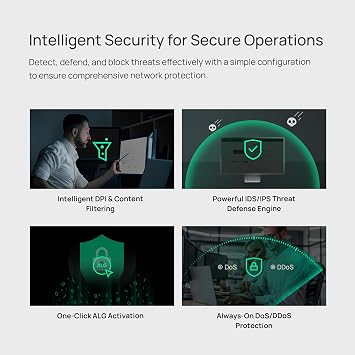
The integrated SPI firewall provides robust protection against external threats, safeguarding your network while enhancing data privacy and security for all connected devices.
Omada SDN Integration
With built-in Omada SDN, the router enables centralized management, making enterprise-level networking easy and efficient for businesses seeking scalable and flexible solutions.
Product Details
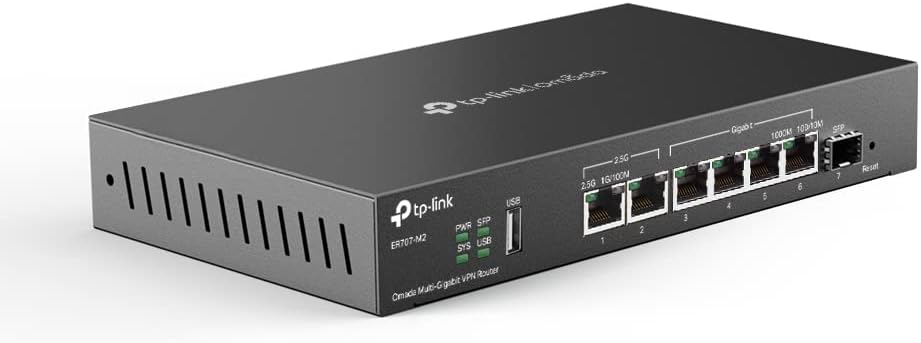
- 【Flexible Port Configuration】1 2.5Gigabit WAN Port + 1 2.5Gigabit WAN/LAN Ports + 4 Gigabit WAN/LAN Port + 1 Gigabit SFP WAN/LAN Port + 1 USB 2.0 Port (Supports USB storage and LTE backup with LTE dongle) provide high-bandwidth aggregation connectivity.
- 【High-Performace Network Capacity】Maximum number of concurrent sessions – 500,000. Maximum number of clients – 1000+.
- 【Cloud Access】Remote Cloud access and Omada app brings centralized cloud management of the whole network from different sites—all controlled from a single interface anywhere, anytime.
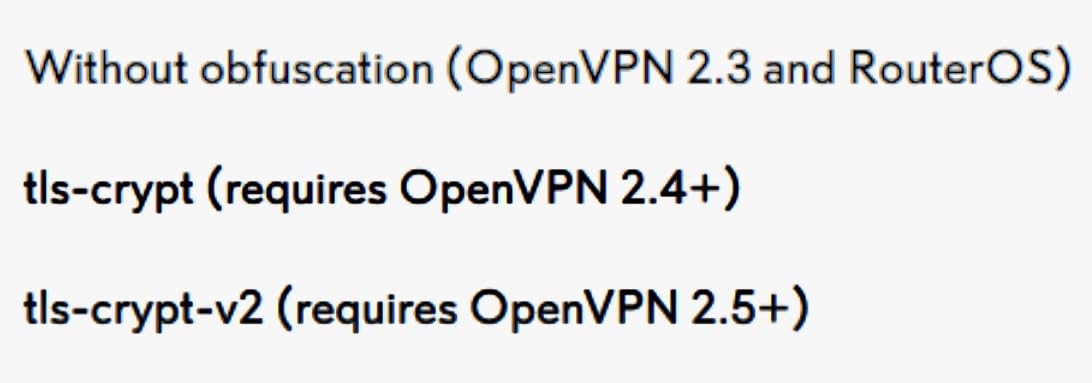
- 【Highly Secure VPN】Supports up to 100× LAN-to-LAN IPsec, 66× OpenVPN, 60× L2TP, and 60× PPTP VPN connections.
| Other Special Features of the Product | Access Point Mode |
| Frequency Band Class | Single-Band |
| Wireless Compability | 802.11ac |
| Compatible Devices | Windows |
| Antenna Location | Business |
| Connectivity Technology | Ethernet |
| Antenna Type | Internal |
| Operating System | ZyNOS |
| Security Protocol | SSL, IPSec, GRE, SSH, IKEv1/v2, PPTP, L2TP, OpenVPN |
| Number of Ports | 6 |
| Control Method | App |
| Data Transfer Rate | 2500 Megabits Per Second |
| LAN Port Bandwidth | 10/100/1000/2500 Mbps |
| Voltage | 9 Volts |
| Maximum Upstream Data Transfer Rate | 5000 Megabits Per Second |
| Number of Antennas | 1 |
| Smart Home Compatibility | Not Smart Home Compatible |
| Router Firewall Security Level | Advanced |
| Has Internet Connectivity | Yes |
| Router Network Type | wired |
| Is Modem Compatible | No |
| Connectivity Protocol | Ethernet |
| Controller Type | App Control |
| Frequency | 2.5 GHz |
| Brand | TP-Link |
| Model Name | ER707-M2 |
| Built-In Media | ER707-M2, Power Adapter, Quick Installation Guide |
| Model Number | ER707-M2 |
| UPC | 840030705274 |
| Global Trade Identification Number | 00840030705274 |
| Manufacturer | TP-Link |
| Mfr Part Number | ER707-M2 |
| Unit Count | 1.0 Count |
| Item Dimensions L x W x H | 12.9"L x 9.5"W x 3.1"H (32.8 x 24.1 x 7.9 cm) |
| Color | Black |
| EU Spare Part Availability Duration | 5 Years |
| Special Feature | Access Point Mode |
| Wireless Communication Standard | 802.11ac |
| Recommended Uses For Product | Business |
| Included Components | ER707-M2, Power Adapter, Quick Installation Guide |
| Package Weight | 6.51 Pound |
What's in the box
ER707-M2
Power Adapter
Quick Installation Guide
Who Should Buy?

-
Small Businesses
Ideal for small businesses needing secure, high-speed internet connectivity with reliable VPN features and load balancing.
-
Remote Workers
Perfect for remote workers who require secure connections to corporate networks with high-speed access through dual WAN ports.
-
Tech Enthusiasts
Great for tech-savvy users looking to customize their home network and utilize advanced features like SDN and firewall protection.

-
Casual Users
Not suitable for casual users who only need basic internet access without the need for high-performance or advanced features.
-
Budget-Constrained
May not be ideal for users with tight budgets as the multi-gigabit capabilities and features come at a higher price point.
-
Non-Technical Users
Less appropriate for non-technical users who may find the advanced settings and features complex and challenging to manage.
Product Description
Have any Query? Chat with us
Customer Questions & Answers
-
Question:
What are the key features of the TP-Link ER707-M2 router?
Answer: The TP-Link ER707-M2 router boasts several key features including dual 2.5Gig WAN ports for high-speed internet connections, robust firewall protection with SPI technology, and Omada SDN integration for seamless network management. Additionally, it supports load balancing, allowing for optimal distribution of network traffic. This combination of features makes it ideal for homes and small businesses that require reliable internet connectivity and advanced security measures. -
Question:
How does the load balancing feature work in the TP-Link ER707-M2?
Answer: The load balancing functionality in the TP-Link ER707-M2 intelligently distributes incoming and outgoing network traffic across its dual WAN ports. This ensures that no single connection becomes overloaded, enhancing overall performance and availability of your internet connection. For example, in a scenario where multiple devices are streaming videos and gaming simultaneously, the load balancing feature helps maintain a stable and fast user experience without interruptions. -
Question:
Can the TP-Link ER707-M2 support VPN connections?
Answer: Yes, the TP-Link ER707-M2 is equipped to support multiple VPN connections. Its built-in VPN capability allows users to securely connect to remote networks, which is beneficial for businesses with remote workers or for secure online transactions. Furthermore, the router can handle encrypted traffic efficiently, making it a solid choice for users prioritizing privacy and security in their internet activities. -
Question:
What is Omada SDN and how does it enhance the TP-Link ER707-M2's performance?
Answer: Omada SDN (Software Defined Networking) is a centralized network management solution that simplifies and optimizes network control. With this technology, the TP-Link ER707-M2 allows users to manage network settings and monitor traffic easily through a single interface. This capability enhances performance by enabling network administrators to quickly identify issues and make adjustments as needed, ensuring a more reliable and efficient network environment. -
Question:
How does the SPI firewall protect your network with the TP-Link ER707-M2?
Answer: The SPI (Stateful Packet Inspection) firewall in the TP-Link ER707-M2 protects your network by monitoring the state of active connections and determining which network packets to allow or block. This deep packet inspection enhances security against potential threats by analyzing incoming and outgoing data. It's particularly valuable for businesses and security-conscious users, providing an additional layer of protection against cyber-attacks and unauthorized access attempts. -
Question:
What types of users would benefit most from the TP-Link ER707-M2 router?
Answer: The TP-Link ER707-M2 is ideal for small business owners, tech-savvy individuals, and families with high bandwidth demands. Its robust features support multiple devices simultaneously without loss of performance. For instance, a small office with employees working remotely could leverage the dual WAN capabilities for continuous internet access while maintaining secure connections—making it an excellent choice for both work and home use. -
Question:
Does the TP-Link ER707-M2 offer any customization options for network configurations?
Answer: Yes, the TP-Link ER707-M2 provides extensive configuration options, allowing users to customize their network settings based on specific needs. Users can set up VLANs, manage bandwidth allocation, and create custom firewall rules to enhance security. This flexibility enables businesses to tailor their network according to their operational requirements, ensuring optimal performance and security based on usage patterns. -
Question:
How do I set up the TP-Link ER707-M2 router?
Answer: Setting up the TP-Link ER707-M2 is straightforward, involving initial connection to the power source and your modem. You can access the setup interface via a web browser, where guided instructions help you configure WAN settings, network names, and security preferences. Once set up, you can easily manage and monitor your network using the Omada SDN interface, making it suitable for users of all technical levels. -
Question:
What is the maximum capacity of devices that can connect to the TP-Link ER707-M2?
Answer: The TP-Link ER707-M2 router is designed to handle high network capacity, with the ability to support numerous devices simultaneously without compromising performance. This is especially crucial for environments where multiple users engage in bandwidth-intensive activities. For example, in a smart home setting, the router efficiently manages connections from smart TVs, gaming consoles, and various IoT devices, ensuring seamless operation. -
Question:
Where can I buy TP-Link ER707-M2 in The Bahamas?
Answer: You can purchase the TP-Link ER707-M2 | Omada Multi-Gigabit VPN Router from Ubuy in The Bahamas. Ubuy offers a wide range of electronics along with great customer service, making it a reliable choice for acquiring tech products like the TP-Link ER707-M2.
TP-Link Routers ER707-M2 Editorial Review


No editorial reviews found
Customer Reviews & Ratings
300 customers ratings
-
5 Star
73%
-
4 Star
13%
-
3 Star
6%
-
2 Star
4%
-
1 Star
4%
Review this product
Share your thoughts with other customers
Product Price History
Important information
- Limitations : For products shipped internationally, please note that any manufacturer warranty may not be valid; manufacturer service options may not be available; product manuals, instructions, and safety warnings may not be in destination country languages; the products (and accompanying materials) may not be designed in accordance with destination country standards, specifications, and labeling requirements; and the products may not conform to destination country voltage and other electrical standards (requiring use of an adapter or converter if appropriate). The recipient is responsible for assuring that the product can be lawfully imported to the destination country. When ordering from Ubuy or its affiliates, the recipient is the importer of record and must comply with all laws and regulations of the destination country.
- Not all the products listed on Ubuy are for sale, as Ubuy is a global search engine. Products are subject to export/trade regulations.
BSD 140
Order now and get it around Sunday, July 05
This item is not restrict in my country.(Please click on above link if this item is not restrict in your country, So our team will review and allow.)
QTY:
Secured transaction
Ubuy works hard to protect your security and privacy. Our advanced payment security system ensures confidentiality by encrypting your information during transmission using AES (Advanced Encryption Standards) and SSL (Secure Socket Layer) protocols. Your payment details are 100% secure as we do not share your payment details with third party sellers.
Our Top Logistics Partners
Fastest cross-border delivery
Features & Benefits
- Features flexible port configuration with multiple high-speed ports.
- Supports up to 500,000 concurrent connections for robust performance.
- Enables cloud management through the Omada app for easy network control.
- Delivers secure VPN connections with multiple supported protocols.
- Offers reliable backup options including 4G LTE with a USB dongle.
- Ideal for businesses needing high capacity and flexibility in network management.