0 ratings


Item #:
147637658
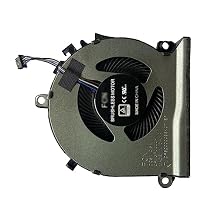
Fan for HP Pavilion Gaming 16-A0020CA 16-A0030NR 16-A0032DX CPU Cooling Fan
Item #:
147637658
BSD 19
Price Details
Excluding Shipping & Custom charges ( Shipping and custom charges will be calculated on checkout )
*All items will import from US
0 ratings
Write a review
In stock
 Imported from USA store
Order now and get it around Monday, July 20
Secured transaction
Ubuy works hard to protect your security and privacy. Our advanced payment security system ensures confidentiality by encrypting your information during transmission using AES (Advanced Encryption Standards) and SSL (Secure Socket Layer) protocols. Your payment details are 100% secure as we do not share your payment details with third party sellers.
Our Top Logistics Partners


For sale is this brand new cpu cooling fan and thermal grease, guaranteed to keep your laptop cool and efficient!

Fast
Shipping

Free
Return*

Secure Packaging

100% Original Products

PCI DSS Compliance

ISO 27001 Certified


What Stands Out
Efficient Cooling
Designed specifically for HP Pavilion Gaming laptops, this fan provides efficient cooling, ensuring optimal CPU performance during intense gaming sessions.
Easy Installation
Features a user-friendly design for straightforward installation, allowing gamers to quickly replace their cooling fan without extensive technical knowledge or tools.
Durable Design
Built with high-quality materials, this cooling fan offers long-lasting performance and reliability, addressing overheating issues and extending the lifespan of your laptop.
Product Details
| Item Weight | 0.5 lbs (230 grams) |
Who Should Buy?

-
Gamers
Designed for gaming laptops, this fan effectively maintains cooling during extended gaming sessions to prevent overheating.
-
Hardware Upgraders
Ideal for users upgrading their HP Pavilion, ensuring optimal cooling for performance-heavy tasks or additional hardware.
-
Tech Enthusiasts
Perfect for DIY repairs and laptop maintenance, enabling tech-savvy users to replace damaged cooling systems easily.

-
Casual Users
Those who use their laptops for basic tasks may not need a cooling fan replacement, limiting its necessity.
-
Inexperienced Users
Users unfamiliar with laptop hardware may struggle with installation, possibly leading to improper setup or damage.
-
Non-HP Models
This cooling fan is specifically designed for HP Pavilion models, making it unsuitable for laptops from other brands.
Product Description
Fan for HP Pavilion Gaming 16-A0020CA 16-A0030NR 16-A0032DX CPU Cooling Fan
Have any Query? Chat with us
Customer Questions & Answers
-
Question:
What are the key features of the HK-Part Fan for HP Pavilion Gaming 16 series?
Answer: The HK-Part Fan is specifically designed for the HP Pavilion Gaming 16-A0020CA, 16-A0030NR, and 16-A0032DX models, ensuring optimal fit and performance. It features a robust design for effective CPU cooling, which is essential for maintaining system performance during intense gaming sessions. The fan operates at various RPMs for adjusted cooling levels, contributes to energy efficiency, and reduces noise, ensuring a quieter gaming experience. Utilizing high-quality materials, it enhances longevity and reliability, making it an excellent thermal management component for any gaming setup. -
Question:
How do I install the HK-Part Fan into my HP Pavilion Gaming laptop?
Answer: Installing the HK-Part Fan requires a few simple tools and steps. First, make sure the laptop is powered off and unplugged. Remove the back panel carefully, locate the old fan, and disconnect its cable. Install the new HK-Part Fan by connecting it to the motherboard and securing it in place. Finally, reattach the back panel, ensuring all screws are tightened properly. This fan installation can significantly improve your laptop's cooling efficiency, which is vital when running demanding applications or games. -
Question:
Is the HK-Part Fan compatible with other HP Pavilion models?
Answer: The HK-Part Fan is tailored specifically for the HP Pavilion Gaming 16-A0020CA, 16-A0030NR, and 16-A0032DX models. While it may fit physically in other models, compatibility in terms of airflow, performance, and electrical connection cannot be guaranteed. It is advisable to consult the laptop’s user manual or contact customer support for the most accurate compatibility information and ensure optimal performance by using the fan designed for your specific model. -
Question:
What are the symptoms of a failing CPU cooling fan?
Answer: Common signs of a failing CPU cooling fan include unusual noises, such as grinding or rattling sounds, and the overheating of your laptop during use. You may also notice system crashes or unexpected shut downs due to high temperatures. Frequent thermal throttling, where the CPU reduces its speed to prevent overheating, can also indicate a cooling issue. If you observe these symptoms, replacing the cooling fan with the HK-Part Fan can restore proper thermal management and enhance system stability. -
Question:
How can I maintain my cooling fan for optimal performance?
Answer: To maintain your HK-Part Fan for optimal performance, regularly clean it from dust and debris. Dust buildup can greatly reduce airflow and cooling efficiency. Use compressed air to gently blow out dust from vents and fan blades. Additionally, ensure that your laptop is used on a hard, flat surface to allow proper ventilation. Keeping your laptop's internal components free of dust not only prolongs the fan's life but also ensures your gaming sessions remain smooth and uninterrupted. -
Question:
What is the expected lifespan of the HK-Part Fan?
Answer: The lifespan of the HK-Part Fan can vary based on usage patterns, but high-quality cooling fans typically last several years under normal operation. Factors that could affect its longevity include frequent overheating, extended gaming sessions without breaks, and dust accumulation. Regular maintenance by cleaning the fan and ensuring good airflow can help maximize its lifespan. The HK-Part Fan is designed to withstand intensive usage, providing reliable cooling performance essential for gamers. -
Question:
Can I replace the fan without professional help?
Answer: Yes, replacing the HK-Part Fan can often be done without professional help, especially with basic technical skills. Following online tutorials or guides specific to your HP Pavilion model can help you through the process. However, if you are unsure or uncomfortable with disassembling your laptop, seeking professional assistance is always a good idea. Proper installation is critical to avoid damaging the laptop and ensuring effective cooling, which is crucial for optimal performance, especially during demanding tasks. -
Question:
Does replacing the fan improve gaming performance?
Answer: Replacing an old or failing fan with the HK-Part Fan can significantly improve gaming performance by enhancing cooling efficiency. A well-functioning cooling system is vital for maintaining the CPU at ideal temperatures during intense gaming. Reduced heat can prevent thermal throttling, allowing your laptop to run games at higher settings smoothly. By ensuring that the internal components stay cool, you enhance overall system responsiveness and reduce the risk of crashes during gameplay. -
Question:
What should I do if my laptop continues to overheat after replacing the fan?
Answer: If your laptop continues to overheat after replacing the fan, several factors could be at play. Start by checking if the HK-Part Fan is installed correctly and functioning as intended. Ensure that vents are clear from dust and obstructions. Monitoring software can help track CPU temperatures; if overheating persists, consider other issues like thermal paste degradation or environmental factors such as operating on soft surfaces that restrict air circulation. If needed, professional diagnostics may be required to explore further. -
Question:
Where can I buy the HK-Part Fan for HP Pavilion Gaming 16-A0020CA, 16-A0030NR, 16-A0032DX?
Answer: You can buy the HK-Part Fan for your HP Pavilion Gaming 16 series at Ubuy, a trusted online retailer. Ubuy offers a seamless shopping experience with a variety of products and reliable service. Simply visit their website, search for the HK-Part Fan, and choose the right model for your laptop. With Ubuy’s extensive selection and convenience, you'll find the perfect cooling fan to keep your gaming machine running smoothly.
SYW·pcparts CPU Cooling Fans Editorial Review
No editorial reviews found
Customer Reviews & Ratings
1 customers ratings
-
5 Star
100%
-
4 Star
0%
-
3 Star
0%
-
2 Star
0%
-
1 Star
0%
Review this product
Share your thoughts with other customers
Product Price History
Important information
- Limitations : For products shipped internationally, please note that any manufacturer warranty may not be valid; manufacturer service options may not be available; product manuals, instructions, and safety warnings may not be in destination country languages; the products (and accompanying materials) may not be designed in accordance with destination country standards, specifications, and labeling requirements; and the products may not conform to destination country voltage and other electrical standards (requiring use of an adapter or converter if appropriate). The recipient is responsible for assuring that the product can be lawfully imported to the destination country. When ordering from Ubuy or its affiliates, the recipient is the importer of record and must comply with all laws and regulations of the destination country.
- Not all the products listed on Ubuy are for sale, as Ubuy is a global search engine. Products are subject to export/trade regulations.
BSD 19
Order now and get it around Monday, July 20
This item is not restrict in my country.(Please click on above link if this item is not restrict in your country, So our team will review and allow.)
QTY:
Secured transaction
Ubuy works hard to protect your security and privacy. Our advanced payment security system ensures confidentiality by encrypting your information during transmission using AES (Advanced Encryption Standards) and SSL (Secure Socket Layer) protocols. Your payment details are 100% secure as we do not share your payment details with third party sellers.
Our Top Logistics Partners
Fastest cross-border delivery
Features & Benefits
- Brand new, original CPU cooling fan.
- Compatible with specific Pavilion Gaming models.
- Includes essential thermal paste for optimal performance.
- Ensures efficient cooling for your laptop.
- All part numbers are interchangeable.
- Visual comparison recommended for compatibility.