- Home Page /
- Electronics /
- Computer Accessories /
- Computer Accessories & Peripherals /
- Audio & Video Accessories /
- Webcams & VoIP Equipment /
- Webcams /
- Logitech BCC950 Desktop Conferencing Solution...
0 ratings



Item #:
1397186
Logitech BCC950 Desktop Conferencing Solution, Full HD 1080p B23 Calling, Hi-Definition Webcam, Speakerphone with Noise-Reducing Mic, for Skype,
90% of respondents would recommend this to a friend
Item #:
1397186
BSD 268
Price Details
Excluding Shipping & Custom charges ( Shipping and custom charges will be calculated on checkout )
*All items will import from US
21%
In stock
 Imported from USA store
QTY:
Only 3 items left in stock.
Order now and get it around Saturday, July 04
Secured transaction
Ubuy works hard to protect your security and privacy. Our advanced payment security system ensures confidentiality by encrypting your information during transmission using AES (Advanced Encryption Standards) and SSL (Secure Socket Layer) protocols. Your payment details are 100% secure as we do not share your payment details with third party sellers.
Our Top Logistics Partners


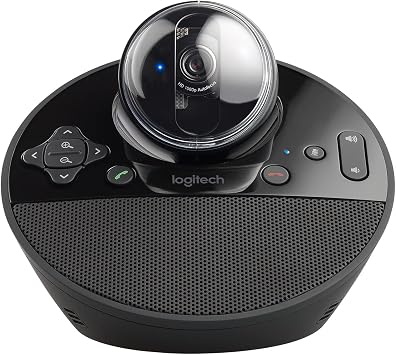
Logitech ConferenceCam BCC950 is the first all-in-one video and audio conferencing device designed with small groups in mind.

Fast
Shipping

Free
Return*

Secure Packaging

100% Original Products

PCI DSS Compliance

ISO 27001 Certified


What Stands Out
Full HD 1080p
Experience crystal-clear video quality during meetings and conferences, ensuring every participant is seen with stunning clarity for effective communication on platforms like Skype and Zoom.
Noise-Reducing Mic
Enjoy uninterrupted conversations with a built-in microphone that filters out background noise, enabling clear audio even in bustling environments, perfect for both home and office use.
All-in-One Design
The integrated webcam and speakerphone provide a streamlined solution for video conferencing, eliminating the need for multiple devices and creating a clutter-free workspace for efficient collaboration.
Product Details
- Logitech BCC950 Desktop Video Conferencing Solution for business-grade video conferencing
- Full HD 1080p video calling with Carl Zeiss lens and 30 fps
- Built-in speakerphone and noise-reducing microphone for clear audio up to 8 feet away
- Plug-and-play USB connectivity compatible with Microsoft Lync 2013, Skype for Business, Cisco Jabber, and WebEx
- Omni-directional sound and echo cancellation for natural conversation experience
- Remote control and base button control for easy call management
| Sensor Type | CCD |
| Connectivity Technology | USB |
| Color | BLACK |
| Features | Low Light |
| Water Resistance Level | Not Water Resistant |
| Has Image Stabilization | No |
| Image stabilization | false |
| Form Factor | freestanding |
| Style Name | Webcam |
| Item Dimensions D x W x H | 6.97"D x 6.81"W x 4.88"H (17.7 x 17.3 x 12.4 cm) |
| Number of Batteries | 1 CR2 batteries required. |
| Operating System | Windows, macOS |
| Maximum Focal Length | 0.1 Meters |
| Maximum Aperture | 2 f |
| Minimum Focal Length | 0.1 |
| Lens Type | Zoom |
| Focus Type | Auto Focus |
| Screen Size | 65 Inches (165.1 cm) |
| Display Resolution Maximum | FHD |
| Flash Memory Type | Micro SD |
| Flash Memory Speed Class | C10 |
| Flash Memory Video Speed Class | V90 |
| Supported Audio Format | MP3, AAC, Opus |
| Number of Speakers | 1 |
| Compatible Devices | Laptop, Personal Computer |
| Brand | Logitech |
| Model Number | 960-000866 |
| Camcorder Type | Video Camera |
| Model Name | bcc950 |
| Built-In Media | Conferencecam^Remote Control^Stem^User Documentation^A/C Adapter^USB Powe Cable |
| Are Batteries Included | No |
| Manufacturer | Logitech |
| UPC | 097855088499 |
| Global Trade Identification Number | 00097855088499 |
| Unit Count | 2.6 Pounds |
| Video Resolution | 1080p, 720p |
| Video Capture Format | AVI |
| Effective Still Resolution | 3 MP |
| Image Capture Speed | 30 fps |
| Shooting Modes | Automatic, Easy |
| Image Aspect Ratio | 16:9 |
| Supported Image Format | JPEG |
| White Balance Settings | Auto |
| File Format | JPEG |
| Exposure Control Type | Automatic |
| Effective Video Resolution | 30 MP |
| Optical Zoom | 100 x |
| Digital Zoom | 4 x |
| Zoom | Digital |
| Photo Sensor Technology | CCD |
| Video Capture Resolution | 1080p, 720p |
| Package Weight | 3 Pound |
What's in the box
Conferencecam^Remote Control^Stem^User Documentation^A/C Adapter^USB Powe Cable
Who Should Buy?

-
Remote Workers
Ideal for remote employees needing high-quality video and audio for effective communication during virtual meetings.
-
Small Teams
Perfect for small teams seeking a reliable and integrated solution for conference calls and collaborations.
-
Educators
Great for teachers conducting online classes who require clear visuals and sound for student engagement.

-
Large Audiences
Not suitable for larger groups as the microphone and camera may not cover extensive areas effectively.
-
Gamers
Gamers may prefer specialized equipment designed for enhanced gaming experiences and low latency video streaming.
-
Mobile Users
Not ideal for frequent travelers looking for portable video conferencing options that fit into personal devices.
Product Description
Have any Query? Chat with us
Customer Questions & Answers
-
Question:
What are the main features of the Logitech BCC950 Desktop Video Conferencing Solution?
Answer: The Logitech BCC950 offers Full HD 1080p video calling, making it ideal for professional video conferencing. Key features include a hi-definition webcam with a wide-angle lens, a noise-reducing microphone for clear audio, and a built-in speakerphone that enhances sound quality. This solution is particularly beneficial for business meetings, remote teamwork, and virtual presentations, ensuring participants can engage effectively despite being apart. -
Question:
How does the noise-reducing microphone work in the Logitech BCC950?
Answer: The noise-reducing microphone in the Logitech BCC950 uses advanced technology to filter out background noise, allowing for clearer communication during video calls. This feature is especially useful in busy or noisy environments, ensuring that your voice comes through without distractions. It is perfect for offices, home workspaces, or any setting where clear audio is essential for effective collaboration. -
Question:
Is the Logitech BCC950 compatible with various video conferencing platforms?
Answer: Yes, the Logitech BCC950 is designed to seamlessly integrate with a wide range of video conferencing applications such as Zoom, Microsoft Teams, and Skype. Having this flexibility ensures you can use the device with your preferred software, making it an excellent choice for professionals who participate in various online meetings or collaborations. -
Question:
What is the optimal usage environment for the BCC950 Desktop Video Conferencing Solution?
Answer: The ideal environment for using the BCC950 is a quiet office or dedicated workspace where distractions are minimized. While it's portable enough for home use, having a space with good lighting and minimal background noise will enhance video and audio quality. This setup can significantly improve virtual meetings with clients or team members, creating a more professional atmosphere. -
Question:
Can I use the Logitech BCC950 for streaming or gaming?
Answer: While the Logitech BCC950 is primarily designed for video conferencing, its high-definition video quality can be leveraged for streaming or casual gaming. However, game streaming may require additional software or settings adjustments for optimal performance. This flexibility makes it a useful tool not only for professionals but also for content creators looking to engage with their audiences. -
Question:
What kind of connectivity options does the BCC950 offer?
Answer: The Logitech BCC950 connects via USB, making it compatible with most computers and laptops without the need for additional drivers. This plug-and-play functionality simplifies setup, allowing users to start video calling quickly. Whether you're connecting to a PC or Mac, this ease of connectivity ensures that the device is ready whenever you need it, making it an ideal choice for those on the go. -
Question:
How does the BCC950 enhance remote collaboration?
Answer: The Logitech BCC950 enhances remote collaboration by providing both high-quality audio and video capabilities. Participants can see and hear each other clearly, which fosters better interaction and engagement. This is particularly advantageous for team meetings, brainstorming sessions, or client presentations, where visual communication plays a crucial role in conveying ideas and maintaining a connection. -
Question:
What is the field of view and zoom capability of the video camera?
Answer: The video camera on the Logitech BCC950 features a wide-angle lens with a 78-degree field of view, providing ample coverage for small group meetings. It does not have optical zoom, but the camera's ability to capture a broad perspective allows multiple participants to be seen clearly in the frame. This is perfect for small teams or presentations where highlighting group dynamics is valuable. -
Question:
Is the camera adjustable or fixed in position?
Answer: The camera on the Logitech BCC950 is adjustable, allowing users to tilt and position it to capture the best angle for video calls. This feature is particularly useful in dynamic environments where meeting setups might change frequently, or when transitioning between different speakers. Users can easily customize the camera's orientation for the best possible visual experience. -
Question:
What kind of lighting is best for optimal video quality with the BCC950?
Answer: For optimal video quality with the Logitech BCC950, natural light or soft, diffused lighting is recommended. Avoid harsh overhead lighting and backlighting, as these can create shadows and reduce image clarity. Positioning yourself facing a window or using ring lights can significantly enhance the video output, making remote meetings appear more professional and engaging. -
Question:
Where can I buy Logitech BCC950 Desktop Video Conferencing Solution?
Answer: You can purchase the Logitech BCC950 Desktop Video Conferencing Solution from Ubuy, which offers a wide selection of tech products and ensures a reliable buying experience. Ubuy provides detailed product listings, customer reviews, and different delivery options, making it a suitable choice for acquiring this device in The Bahamas.
Logitech Webcams 960-000866 Editorial Review


No editorial reviews found
Customer Reviews & Ratings
1443 customers ratings
-
5 Star
69%
-
4 Star
15%
-
3 Star
5%
-
2 Star
3%
-
1 Star
8%
Review this product
Share your thoughts with other customers
Product Price History
Important information
- Limitations : For products shipped internationally, please note that any manufacturer warranty may not be valid; manufacturer service options may not be available; product manuals, instructions, and safety warnings may not be in destination country languages; the products (and accompanying materials) may not be designed in accordance with destination country standards, specifications, and labeling requirements; and the products may not conform to destination country voltage and other electrical standards (requiring use of an adapter or converter if appropriate). The recipient is responsible for assuring that the product can be lawfully imported to the destination country. When ordering from Ubuy or its affiliates, the recipient is the importer of record and must comply with all laws and regulations of the destination country.
- Not all the products listed on Ubuy are for sale, as Ubuy is a global search engine. Products are subject to export/trade regulations.
BSD 268
Order now and get it around Saturday, July 04
This item is not restrict in my country.(Please click on above link if this item is not restrict in your country, So our team will review and allow.)
QTY:
Only 3 items left in stock.
Secured transaction
Ubuy works hard to protect your security and privacy. Our advanced payment security system ensures confidentiality by encrypting your information during transmission using AES (Advanced Encryption Standards) and SSL (Secure Socket Layer) protocols. Your payment details are 100% secure as we do not share your payment details with third party sellers.
Our Top Logistics Partners
Fastest cross-border delivery
Features & Benefits
- Transform any office or meeting space into a business-grade small group video conference room
- Freestanding wide-view HD webcam with an enterprise-quality speakerphone in one device
- Run video conferences anywhere in the office, without competing for time on overbooked conference room systems
- Business-grade HD video, Carl Zeiss lens, and advanced auto light correction
- Built-in full duplex speakerphone and integrated omni-directional microphone with noise and echo cancellation
- Easy to setup and control video meetings using virtually any video conferencing platform